


Published: Nov 10, 2026
Digital, Media, or Marketing: Which Asset Management Software Does Your Team Need?
Table of contents
Which asset management software does a marketing team need? (the short answer)
What each asset management label actually means
DAM vs media asset management vs marketing asset management at a glance
Match your team's problem to the right software
What to check before you sign an asset management contract
How Air covers the DAM, marketing, and brand asset jobs in one library
Buy the right tool for the problem you need to solve
Asset management software for marketing teams FAQs
Your agency says you need a DAM. Your video lead keeps asking for a MAM, and the vendor in last week's demo called its product marketing asset management software. If you're the marketing lead signing off on the budget, it can look like three different purchases.
The problem your team is living with says far more than the label, whether that's version confusion, stalled approvals, partners asking for the logo again, or raw footage piling up by the terabyte.
This guide gives you the short answer first, then plain definitions, a problem-to-software match, a side-by-side table, and a shortlist checklist.
Which asset management software does a marketing team need? (the short answer)
Most marketing teams need a digital asset management (DAM) platform that also handles review, approval, and adapting assets for each channel. That combination is what some vendors package and sell as “marketing asset management”.
There is one real exception though. If your team shoots raw multi-camera footage, edits from proxies, and archives at broadcast scale, you need a traditional media asset management (MAM) system, which is genuinely different.
Another close sibling, brand asset management, sits in between: it's usually a governed, access-controlled layer on top of the same library rather than a separate purchase.
However, where the category does matter is budget. A broadcast MAM bought for a social video library is far more system than you'll use, while generic cloud storage bought to run campaigns leaves sign-off stranded in email and Slack. Air treats all these labels as different front doors into the same building, because the job behind them hasn't changed.
What each asset management label actually means
Each label describes roughly the same library with a different center of gravity, such as findability, video at scale, campaign throughput, or brand governance. Knowing which one your team needs is most of the decision.
Digital asset management (DAM)
Digital asset management is a central system for storing, organizing, finding, approving, and distributing the files your brand creates and uses, with metadata, permissions, and version history kept on each one. A DAM typically holds photography, video, design files, PDFs, presentations, logos, and product imagery.
When this guide says "a traditional DAM," it means the storage-first take on what digital asset management is: strong at holding finished files, and weaker at the creative work that happens before approval and after it.
Media asset management (MAM)
A traditional media asset management system is built for broadcast and post-production video at scale. That means ingesting and transcoding pipelines, proxy workflows, timecode, long-term archive tiers, and deep ties to editing suites. Broadcasters, studios, sports organizations, and post houses are the usual buyers.
For most marketing teams, the edges have blurred. For example, when a marketer asks for a MAM, they usually want a library where finished video is as easy to search, review, and reuse as a photo, which is a DAM that handles video properly. That's the approach behind Air's take on media asset management software, and a dedicated DAM vs MAM comparison breaks down the full split.
Marketing asset management
Marketing asset management covers much the same asset layer as a DAM, with the emphasis on moving campaign assets through review, approval, distribution, and adaptation for each channel. In a demo, the difference shows up as approvals, comments, channel resizing, and campaign-level organization built in rather than bolted on.
Brand asset management
Brand asset management governs approved brand assets and who can use them, usually on top of the same library. It typically shows up as a brand portal or curated share page where agencies, resellers, partners, and regional teams pull logos, templates, and approved creative without asking a designer.
Marketing resource management and project tools
Marketing resource management (MRM) platforms and project tools like Asana and monday.com manage plans, budgets, briefs, and ownership rather than files, and no asset platform replaces them. The reverse is also true. A task tool with attachments isn't asset management, because feedback and approvals end up attached to the ticket instead of the asset.
DAM vs media asset management vs marketing asset management at a glance
Digital asset management and marketing asset management describe one library with different priorities, while a traditional media asset management system serves a different team entirely. Here's how all five categories compare.
Category | Built for | Who uses it | What it works with |
Digital asset management (DAM) | Storing, finding, and governing a brand's files | Creative, marketing, and brand teams | Photos, video, design files, documents, logos |
Media asset management (traditional MAM) | Broadcast and post-production video at scale | Editors, post-production, broadcast engineering | Raw footage, proxies, masters, long-term archive |
Marketing asset management | Moving campaign assets through review, approval, and channel adaptation | Marketing managers, campaign and content teams | Campaign creative, channel variants, approved finals |
Brand asset management | Governing approved brand assets and who can use them | Brand managers, agencies, partners, regional teams | Logos, templates, guidelines, approved creative |
MRM and project tools | Planning, budgets, and ownership | Marketing ops, project managers | Briefs, timelines, budgets, tasks |
The takeaway: three of these five rows describe one library with different priorities.
You may also see creative asset management, a label that puts working files and creative context alongside finals.
Two more systems often get mixed into the same conversation: a CMS, which publishes your pages, and a PIM, which holds product data.
Match your team's problem to the right software
Feature lists blur together after the third demo, so instead, find the problem below that sounds most like your week. In reality each one points to a different purchase.
1. Nobody can say which version of the hero went live
Three versions of the hero are circulating in Slack, working files sit in one tool and finals in another, and nobody can say which "final_v3_approved" actually shipped.
What fits: a DAM. Look for version history stacked on each asset and one system for working files and finals. Without both, someone re-exports from an outdated source and the team fixes the same mistake twice. Shared drives rarely manage either well, which sits at the heart of the digital asset management vs. cloud storage trade-off.
2. Campaigns stall between sign-off and every channel's sizes
The creative is finished, but the campaign isn't. Feedback lives in email, approval lives in a thread, and someone still has to produce 14 sizes before anything can launch.
What fits: what vendors sell as marketing asset management, which in practice is a DAM with approvals and adaptation built in. Creative teams build the standard and marketing teams run from it, and the wrong tool breaks that handoff.
3. Agencies and partners keep asking for the logo and the latest kit
The requests never stop. Outdated logos show up in partner materials, and files go out through transfer links with no expiry and no record of who has them.
What fits: brand asset management, or a branded portal on top of your DAM. Check for curated access by audience, expiring links, usage rules that travel with the asset, and visibility into who downloaded what.
4. Finished cuts and social edits you have to scrub through to find
Your library of finished video keeps growing, and nobody can find the 12 seconds they need without opening six files.
What fits: a DAM with real video handling. That means transcripts, search by what's said or shown, scrubbable previews, and frame exports. This is where DAMs built for video and rich media pull clearly ahead of storage-first ones.
5. Raw footage, proxy editing, and archive-scale storage
Multi-camera shoots generate terabytes of raw media per project, and editors need proxies and timecode-accurate workflows to cut it.
What fits: a broadcast MAM. This is the one case where the category genuinely differs, so check archive tiering, ingest automation, and editing-software integration first.
6. Missed deadlines and nobody sure who owns what
This one often gets misread as an asset problem. If the real issue is plans, budgets, and who's doing what, none of the asset categories above will fix it.
What fits: marketing resource management or a project tool. Run it alongside your asset library rather than trying to make either one do both jobs.
What to check before you sign an asset management contract
Once the category is settled, the shortlist narrows fast.
Must-haves:
Search that works without knowing the exact filename
Version history on the asset itself
Approvals tied to the file, not to a task or an email thread
Permission controls for agencies, freelancers, and other external collaborators
Nice-to-haves:
Figma, Canva, and Adobe integrations
CMS or commerce connections
Slack notifications
Performance data on published creative
Signs you're overbuying:
Per-seat pricing that discourages you from inviting stakeholders
A multi-month implementation
A taxonomy that needs a dedicated admin to maintain
Broadcast features your marketing team will never touch
Then run the stitched-stack test: Count the tools one asset passes through between brief and launch, such as cloud storage, a review tool, a transfer tool, a resizing tool, and an approval buried in chat, and treat every handoff as a cost. Anyone running creative operations knows that cost well: downloading, re-uploading, and renaming.
Finally, check for AI readiness. A blank AI model doesn't know what's approved or on-brand, so judge whether a platform's AI can act on your actual library, brand rules, and approval history.
How Air covers the DAM, marketing, and brand asset jobs in one library
Air is a DAM with AI built in that goes further than a traditional DAM: an agent for creative tasks that knows your brand, executes on your library, and scales approved work across every channel.
Working files and finals in one place
In Air, working files and finals live in the same workspace, and each file keeps its history. Native Cloud Imports pull archives straight from Google Drive, Dropbox, Box, and SharePoint. Air also works alongside Asana and monday.com rather than replacing them, so planning stays where it already lives.
Candid moved its creative off a mix of Dropbox, Google Drive, and physical hard drives, and just over a year later had built a searchable Air workspace of 90,000 assets.
Approval status that lives on the asset
New versions stack on the original, so the latest approved file is always obvious and the “final” file clutter disappears. Feedback comments pin to a specific spot on an image or a timestamp on a video, and threads resolve inline.
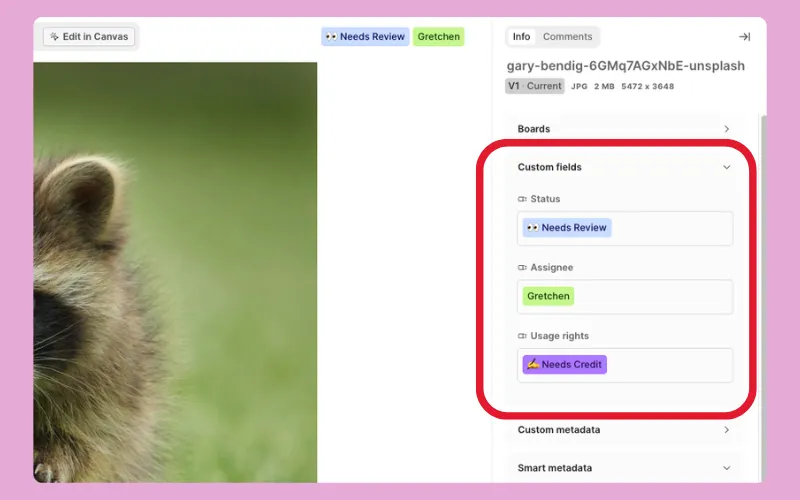 Multi-stage approvals can then track owners and due dates on the file itself, instead of scattering sign-off across email, Slack, and task comments.
Controlled sharing and brand context for agencies and partners
Secure share links show agencies and partners exactly what you choose, with password protection and expiration dates on Business and Enterprise plans, and Showcases package approved work into one curated link, branded with your logo and colors on Business and Enterprise. On Enterprise, access-controlled libraries partition content by brand or region, alongside SSO and custom roles.
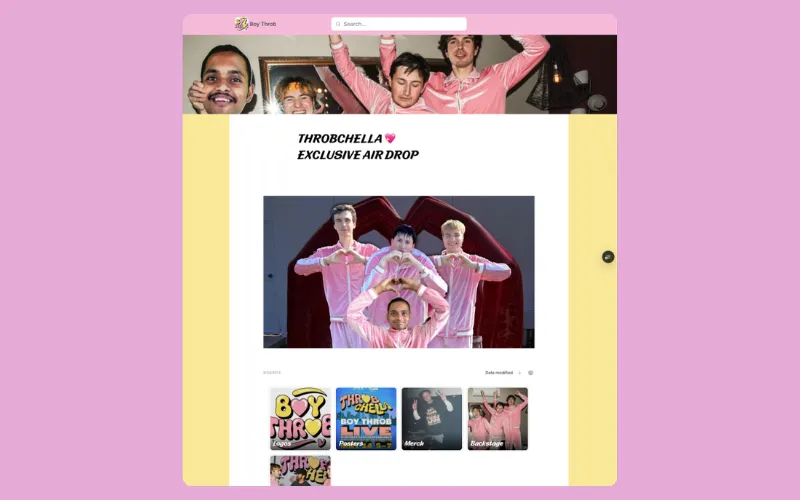 Context stores your fonts, colors, logos, and usage rules as brand kits, and Air applies them to every AI edit, so outputs stay on brand without extra review rounds. With Air Canvas, marketing can turn one approved design into hundreds of on-brand channel variants, and Skills save any AI edit as a reusable workflow your team can run across a batch of assets.
Search that doesn't depend on the filename
Conversational Search lets anyone find assets with plain-English queries like "person holding a toothbrush," backed by auto-tagging and OCR. At Candid, that changed who does the finding:
"Before Air, our Lead Brand Designer, Carly, spent up to 20% of her week finding assets for people. Now it's around 2%."
For video, Air generates transcripts so you can search footage by what's said or shown, which is the kind of video asset management most marketing libraries need.
Buy the right tool for the problem you need to solve
The label matters far less than the problem, and most marketing teams are buying one thing under three names:
Versions and findability: a DAM
Campaigns stalling after sign-off: marketing asset management, meaning a DAM with approvals and adaptation built in
Partner requests: brand asset management, or a portal on the DAM
Raw video at broadcast scale: a traditional MAM
Planning and ownership: a project tool
Whichever fits, the goal is to stop remaking what already exists and start building on what works. For a low-risk test, import one campaign's assets into Air and run its review and channel adaptation through the platform.
Or, see how Air can help your team understand, organize, and scale creative with a personalized product walkthrough.
Asset management software for marketing teams FAQs
Do we need marketing asset management software if we already have a DAM?
Not necessarily. If your DAM already handles review, approval, and channel adaptation, you have what vendors sell as marketing asset management; if it only stores finished files, those are the gaps to close.
Does MAM mean media asset management or marketing asset management?
Usually media asset management, traditionally built for broadcast and post-production video. Some vendors use MAM for marketing asset management too, so ask which one they mean before comparing prices.
What is the difference between digital asset management and marketing asset management?
They manage largely the same library. DAM centers on storing, finding, and governing files, while marketing asset management centers on moving campaign assets through review, approval, distribution, and adaptation for each channel.
Where does brand asset management fit alongside a DAM?
Usually on top of the DAM, as a governed layer that controls which approved brand assets agencies, partners, and regional teams can see and use, often through a portal.
Can one platform cover DAM, marketing, and brand asset management for a marketing team?
Yes, for most marketing teams, because all three manage the same library with different priorities. In Air, working files, finals, approval status, and controlled share links all live in one workspace.
Is Air a DAM or a media asset management system?
Air is a DAM with AI built in that goes beyond a traditional DAM, including transcripts and search for video. It isn't a broadcast MAM built for raw footage, proxy editing, and archive-scale storage.