


Published: Nov 01, 2026
DAM implementation: A phased rollout plan for creative and marketing teams
Table of contents
What DAM implementation actually involves
Why DAM implementation plans stall
A phased DAM implementation plan you can turn into a project doc
How AI shortens DAM implementation
Make the rollout stick for your team
DAM implementation FAQs
The contract is signed and the workspace is live. Now the rollout belongs to you: the creative or marketing lead who championed the platform and has to get everyone else using it.
Rollout decisions, not the software, determine whether a DAM implementation sticks: who owns it, what gets measured, how much structure you ask for on day one, and whether people can find things faster than they could in Drive. Get those wrong and the team slowly slides back into Drive, Dropbox, and Slack threads, and the new library becomes one more place to lose files.
In this guide you’ll learn what implementation covers beyond the import, why rollouts stall, a phased plan you can lift into a project doc, and where AI shortens setup. It's the long version of the phased plan in our digital asset management guide.
Side note: This guide is for that "we've bought it, now what?" moment. If you're still choosing a platform, start with our DAM migration page, which covers outgrowing Drive or Dropbox, replacing a legacy DAM, and how the import itself works.
What DAM implementation actually involves
DAM implementation turns a platform you've bought into the place your team actually goes for creative. The import is the first part, but the rest is about deciding how assets get described, who can do what, how work moves to approval, and how people build the habit.
A digital asset management implementation project plan usually covers:
An asset audit
Taxonomy and metadata
Migration scope
Roles and permissions
Approval workflow
Integrations with the tools people already use
Training
Post-launch review
There's no standard number of weeks, so the timeline depends on how big and how messy the existing library is, how many teams and regions touch the same assets, whether agencies and freelancers need access, how many integrations are in scope, and whether IT or legal has to sign off.
Why DAM implementation plans stall
Most stalled rollouts fail in one of four ways:
No named owner. When the rollout belongs to everyone, nobody decides what a board is called, what counts as approved, or who answers questions in week three.
Too many required fields on day one. Fifteen mandatory fields look thorough in a planning doc, but in practice, uploads stop. Start with the handful of fields people will actually fill in.
Importing the old mess as-is. Copying a decade of duplicates, stale exports, and FINAL_v7 files into a new system reproduces the old chaos with a better search bar.
No adoption plan. If the old storage stays open and training is one all-hands demo, the team keeps two systems and trusts neither.
Our guide on why Air’s learning curve is worth the climb starts from a familiar failure: the platform gets bought, the migration happens, and within six months the team is back in Drive.
A phased DAM implementation plan you can turn into a project doc
This plan is mainly for lean creative and marketing teams. Instead of migrating everything and announcing it company-wide, you prove the setup on live work with a small group, bring in the most-used assets first, then widen access and review on a schedule.
Air is the worked example for the mechanics, but the sequence works on any platform.
Phase | What you do | Key decisions and outputs | Air specifics |
1. Set goals | Pick two or three goals tied to signals you can observe | Baseline taken before launch (Slack request count, time to find a file); goals signed off by the creative lead and the marketing lead | — |
2. Audit | List the assets people requested most last quarter, not every folder | Four buckets: migrate now, migrate later, archive, delete; duplicates resolved; every storage location mapped | Candid: 90,000 assets, 5.5 TB in one workspace |
3. Owner and schema | Name one admin owner; set up a handful of custom fields; name boards the way people ask for things | Definitions for approved, current, expired, and on-brand; rules for working files vs. finals | Only admins create custom fields; one file can sit on several boards; Version Stacking; Context brand kits |
4. Pilot | 5–10 people, one live campaign, one asset type or brand | Answers on field names, findability, approval path, and where feedback lands; rule for where new files go from day one | Pinned and timestamped comments; Eight Sleep example |
5. Import | "Migrate now" list first, archive later | Import order set by demand | One-time copy from Drive, Dropbox, Box, and SharePoint (SharePoint may need IT approval); custom migration is Enterprise only |
6. Permissions | Decide who can upload, edit metadata, approve, and share, and what stays restricted | Library split by brand, region, campaign, or team | Access-controlled libraries, custom roles, and SSO are Enterprise; passcode and expiring links are Business+ |
7. Training | Train by role; close the old storage location | One place to look | Figma and Canva integrations; Air Flow (Mac); Sanity, WordPress, and Shopify are Enterprise; unlimited users on Business+ |
8. External partners | Open access after the schema is proven internally | Partner brief: file naming, required fields, deliverable vs. working file | Content collection forms: no account needed, required custom fields |
9. Reviews | Check in at 30, 60, and 90 days | 30: anyone still in the old system? 60: are fields being filled in? 90: have the baselines moved? | — |
Phase 1: Set two or three goals and decide how you'll measure them
Cap it at three goals, and tie each one to something you can observe, such as:
Fewer "where's the latest?" requests in Slack or email
How long it takes a marketer to find an approved asset without help
How many assets get reused instead of remade
Make sure you capture a baseline before launch: count asset requests in one Slack channel for a week, or time two or three people finding the same file in your current system.
Have two people sign off on the goals: the creative lead who owns brand quality and the marketing lead whose team will use the library most. Keep this step focused on adoption signals (the financial case is covered in our guide to DAM ROI).
Phase 2: Audit what people actually reach for
Audit by demand, not volume. Instead of inventorying every folder, list the assets people requested most last quarter: logos, product shots by SKU, hero images, campaign video cutdowns, and templates. Your last few campaigns should show what people searched for and which assets got reused.
Sort what you find into four buckets:
Migrate now
Migrate later
Archive
Delete
Resolve duplicates and stale exports at this point before import. Then map everywhere assets live today: shared drives, Dropbox, Box, SharePoint, laptops, external hard drives, and agency folders.
This doesn't take an enterprise ops department. Candid's marketing team moved assets scattered across Dropbox, Google Drive, servers, and hard drives into one searchable Air workspace, which held 90,000 assets and 5.5 TB of data just over a year later.
Phase 3: Name an owner and build a lean starting schema
Name one rollout owner and make them a workspace admin. In Air, only admins (and Workspace Owners on Enterprise) can create or delete custom fields, so whoever designs the schema needs the permissions to maintain it.
Start with a handful of custom fields drawn from the audit. Choose from options like campaign, channel, product or SKU, region, approval status, usage rights, and expiration date, and keep only the ones your team will fill in. Our guide to DAM metadata and taxonomy goes deeper on field design.
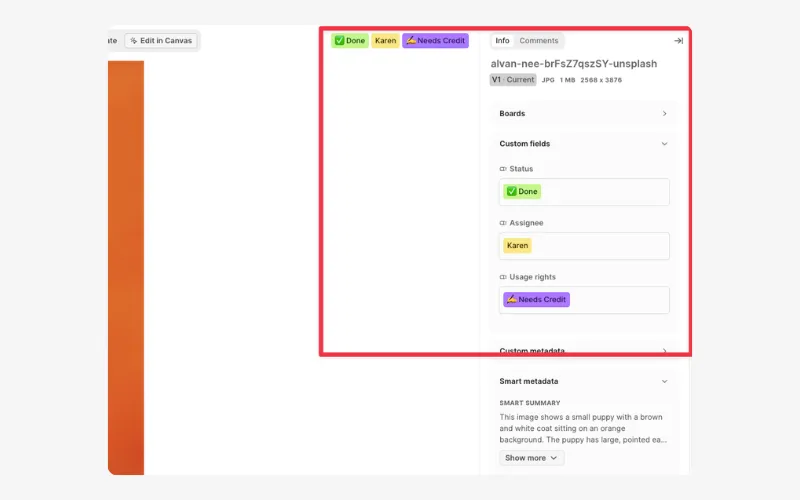 Then name boards the way people ask for things ("Spring campaign: paid social"), not the way files used to be stored. In Air, one file can sit on several boards without duplicating storage, so a hero image running across three campaigns doesn't need a single "correct" home.
Before launch, define your key terms:
Approved: who signs off, and how that shows on the asset.
Current: In Air, Version Stacking puts each new iteration on top of the original, so the latest file is the obvious one and earlier versions stay in its history.
Expired: which date field triggers it, and who checks it.
On-brand: the standard you hold work to. Air's Context holds your brand kits (fonts, colors, logos, and usage rules), so that standard lives in the workspace instead of a PDF.
You should also decide at this point whether working files sit alongside finals and get filtered by status, or live on separate boards until they're signed off.
Phase 4: Pilot with a small group on one live campaign
Keep the pilot to five to ten people, one real campaign in flight, and one asset type or one brand. Skip the test campaign, because test work gets polite feedback while live work surfaces real friction.
The pilot should answer a few questions:
Do the field names make sense to a marketer?
Can someone find an asset without asking a designer?
Does the approval path match how the team already reviews work?
Is feedback landing on the asset, or still drifting into Slack and email?
In Air, reviewers pin comments to a spot on an image or leave timestamped notes on video, and approvals, owners, and due dates sit on the file itself. At Eight Sleep, Executive Creative Director Khoi Phan checks whether edits landed by scrubbing straight to his own comments on a cut: "I didn't need to watch the whole video again."
Make sure you set one rule on pilot day one: decide where new files go from now on. Importers copy existing content once, and later changes in the source don't come across. If the pilot campaign's new exports keep landing in Drive, the library falls out of date almost immediately, so new work for the pilot goes straight into Air (or your chosen platform).
Phase 5: Import the most-used work first
Air's importers for Google Drive, Dropbox, Box, and SharePoint copy content in once and leave the source untouched. SharePoint may need an IT admin to approve the connection first, so ask early. For teams moving off a legacy platform, custom content migration to Air is available on the Enterprise plan.
Sequence the actual import by demand: the "migrate now" list from your audit first, then the archive once your taxonomy has settled. At Candid, a searchable library meant their Lead Brand Designer went from spending up to 20% of her week finding assets for other people to around 2%.
Phase 6: Set permissions before you widen access
Settle these questions before anyone outside the pilot logs in:
Who can upload?
Who can edit metadata?
Who can approve?
Who can share externally?
Which areas stay restricted?
Segment the library by brand, region, campaign, or team, so marketing self-serves from approved finals while work in progress stays internal.
On Enterprise, Air adds access-controlled libraries, custom roles, and SSO (SAML 2.0). For external review, partners can open share links without joining your workspace (they're prompted to sign up if they want to comment), and on Business and Enterprise those links can carry passcodes and expiration dates.
Phase 7: Train by role and close the old doors
Skip the single all-hands session and train by role:
Designers: uploading, versioning, and working from Adobe or Figma
Marketers: search, filters, and sharing
Approvers: review and sign-off, nothing else
The most effective adoption tactic is to make the new system easier than the old folders, then close the duplicate storage location so there's only one place to look.
For designers in particular, Air's Figma plugin and Canva app integrations pull approved assets into designs. Eight Sleep's designers use the Figma integration to pull already-tagged Air content in mid-build.
For Mac designers, Air Flow syncs boards into Finder, so they can open a file in Photoshop or Premiere and save it straight back without exporting or re-uploading. CMS and commerce integrations with Sanity, WordPress, and Shopify are available on Enterprise.
Air's Business and Enterprise plans also include unlimited users, so nobody has to ration logins or decide which stakeholders are worth a license.
Phase 8: Open the system to agencies, freelancers, and partners
External contributors come last because your schema and approval path should be proven internally first.
Air's content collection forms give freelancers, photographers, and agencies an upload link with no account needed.
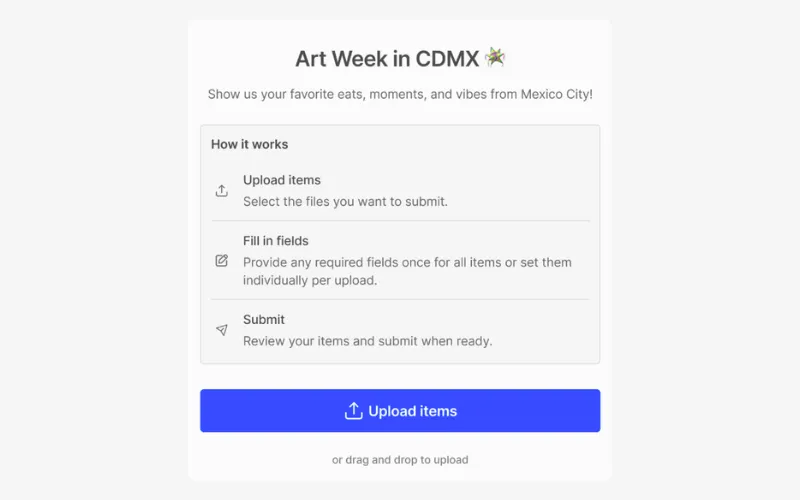 Form creators can mark custom fields as required (on any form not set to auto-submit), and contributors can't submit until those fields are filled in, so incoming work arrives with campaign, usage rights, and shoot details already attached.
Pair every form with a short partner brief covering:
How to name files
Which fields are required
What counts as a deliverable versus a working file
Phase 9: Review at 30, 60, and 90 days
Check in at 30, 60, and 90 days, with one question per checkpoint:
Checkpoint | Question to answer | What to change |
30 days | Is anyone still working out of the old system? | Close remaining duplicate locations and retrain the holdouts by role |
60 days | Are custom fields being filled in or ignored? | Retire unused fields and rename boards people search for differently |
90 days | Have your Phase 1 baselines moved? | Add the one integration that keeps coming up in requests |
Remember: governance doesn't end at launch. Expiring assets, usage rights, and approval status all need an owner with a proper DAM workflow after go-live.
How AI shortens DAM implementation
For most teams the old setup bottleneck was tagging. Someone had to keyword a backlog of thousands of images by hand before the team could properly search for it.
In Air, Smart Tags are applied to images automatically on upload, so an imported backlog becomes searchable by what's in it without anyone manually tagging it first.
Conversational Search makes an imperfectly organized library usable from the start: a marketer can type "woman with a toothbrush" and find the shot, even if its filename is a camera default.
AI handles tagging and retrieval at volume, while humans still decide the schema, what "approved" means, and which work is worth keeping.
It's also why implementation matters beyond search. Air's agent for creative tasks can rename files, apply consistent tags, build boards from approved assets, and generate variants. But an agent can only scale work it knows is approved, on brand, and current, and a well-run implementation is what produces that context.
Make the rollout stick for your team
DAM implementation is won by narrowing scope, naming an owner, and proving the system on live work before you scale it outward.
Here’s what that looks like in summary:
Set a few measurable goals
Audit what people actually reach for
Start with a lean schema
Pilot it on one campaign
Import the most-used work first
Open access and review at 30, 60, and 90 days
Air is the system of record you can use to implement this plan: assets, versions, feedback, approvals, and brand context in one visual workspace, with an agent that acts on the library once it's organized.
Talk to the Air team about scoping your migration. The goal isn't a tidier folder tree. It's to stop remaking what already exists and start building on what works.
DAM implementation FAQs
How long does DAM implementation take?
It depends on scope, not a fixed timeline: library size and messiness, the teams and regions involved, external access, integrations, and IT or legal sign-off all stretch or shorten the rollout.
Who should own a DAM rollout?
One named person, usually the creative or marketing lead, with admin rights so they can maintain the schema. The creative lead and the heaviest-using marketing lead should sign off on the goals.
How do you measure DAM adoption?
Capture a baseline before launch, such as weekly asset requests in Slack or time to find a specific file, then compare at 30, 60, and 90 days alongside old-system use and custom field completion.
What should you migrate into a new DAM, and what should you leave behind?
Migrate the most-requested assets first and the archive once your taxonomy is stable. Resolve duplicates and stale exports before import so the old mess doesn't move with you.
How many metadata fields should you start with?
A handful, drawn from what your audit shows people search for. Add more based on real usage, and retire any that go unfilled.
Does importing from Google Drive or Dropbox delete anything from the original source?
No. Air's importers copy content in once and leave the source untouched, but later changes in the source don't sync across, so decide on pilot day one where new files go.
How does Air help teams implement a DAM without manually tagging their whole library?
Smart Tags are applied to images automatically on upload, on any Air plan, and Conversational Search finds assets by what's in them, so nobody hand-tags the backlog before search works.