


Published: Nov 02, 2026
How to Build a DAM Taxonomy and Metadata Schema Your Team Will Keep Using
Table of contents
What is the difference between metadata and taxonomy?
How to build a DAM taxonomy in five steps
DAM taxonomy examples for a multi-brand creative team
How Air supports a DAM taxonomy and metadata schema
Build a taxonomy that survives contact with your team
DAM taxonomy FAQs
Imagine that it's Thursday afternoon, and the paid social lead needs the approved summer shots that are still cleared for paid use. The shoot is in the library somewhere, but answering the question means opening every folder, checking each file against a rights spreadsheet nobody has updated since June, and messaging the photographer to ask what the license covered.
Most teams in that spot simply have the wrong kind of structure: a deep folder tree and a tag list where everyone tagged their own way. And when teams do build a taxonomy, it usually fails because it's too elaborate to maintain. The goal then is a small, enforced schema built around how people actually search.
This guide covers the difference between the two, a five-step build, a worked schema, where AI tagging fits, and how Air handles each part.
What is the difference between metadata and taxonomy?
The terms get used interchangeably, but here's what each actually means:
DAM metadata is the information attached to each asset, such as: what's in it, who can use it, and file details like camera and format.
A DAM taxonomy is the agreed set of categories and allowed values that keeps that information consistent across everyone who touches the library.
DAM metadata: the information attached to each asset
Digital asset management metadata covers what's in an asset, who shot it, who can use it, where it can run, and its file details. It falls into three types:
Descriptive: what you see (like product, color, people in frame)
Administrative: what you're allowed to do with it (like usage rights, owner, approval status)
Technical: how the file was made (like camera, format, dimensions, copyright)
AI can now generate most of that descriptive layer on upload. The administrative layer, however, almost always needs a human decision because no model can see a signed license or know that the legal team cleared a shot yesterday.
DAM taxonomy: the agreed categories and allowed values
A digital asset management taxonomy is the structure that classifies assets inside a DAM: the fields that exist, the values allowed in each, and the shared vocabulary.
The core idea is a controlled vocabulary. "Approved," "In review," and "Archived" live in a fixed list, so nobody types "OK to use" while a teammate types "final-final."
Here are three common taxonomy models:
Hierarchical: nested categories, like a folder tree. Each asset sits in one branch.
Flat tags: free-form keywords. Flexible, but they go out of sync fast without rules.
Faceted: independent fields (brand, campaign, channel, status) that combine in search, so one asset can belong to several campaigns and channels at once.
The most common failure is a hierarchy that's too deep. Nobody remembers whether the file sits under Campaign > Channel > Product or Product > Campaign > Channel, so people stop looking and start re-exporting.
This means that faceted is the better default for visual libraries, because it also settles the folder-versus-metadata question: a folder forces one path to an asset, while metadata lets it surface through many queries.
How to build a DAM taxonomy in five steps
Done in this sequence, the schema you set up stays small enough to enforce even as your library scales.
Step 1: Start from what people actually search for
Pull the last three to six months of "do we have…?" requests from Slack, email, and your ticket queue, then group them into patterns.
Each request should tell you which fields you need. For example, "the approved holiday TikTok product shot" points to four: approval status, campaign, channel, and product. Run 30 requests through that filter and the same handful of fields keeps showing up.
Then, build the taxonomy around how your team searches. Designers file by project and date, while marketers search by outcome: what's approved, for which channel, featuring which product. Test your draft field list against real queries from real teammates before building anything.
For why libraries fail to surface work they already hold, see our guide on why your system can't find your assets.
Step 2: Lock in five to seven required fields
If you have a lean team, you can start with a minimum viable schema (the small set of custom fields our DAM guide recommends), with each field as a fixed select list rather than free text:
Approval status: In progress, In review, Approved, Archived
Usage rights: Owned, Licensed (paid and organic), Licensed (organic only), Internal only, Expired
Brand or product: your brand or product names, exactly as written in your style guide
Campaign: Spring launch 2026, Summer 2026, Holiday 2026, Evergreen
Channel: Paid social, Organic social, Email, Web, Retail
Asset type: Lifestyle photo, Product photo, Video, Graphic, Logo
Owner: the person accountable for the asset
Approval status and usage rights carry the most weight, because together they answer the question that stalls campaigns: can I use this right now, and where?
Make the fields required at upload, or coverage will start to differ within weeks.
Step 3: Let AI tagging handle what's inside the file
AI can describe what's in a file (objects, colors, concepts, text in an image, faces, and spoken words in video), but it can't know whether your legal team cleared the shot or which campaign it belongs to.
For that reason, keep required fields as fixed lists, let AI fill the descriptive layer, and leave free-form tags open for the long tail, like a one-off event name.
In Air, Visual Recognition and Auto-Tagging apply Smart Tags based on concepts, colors, and objects at upload, so assets are findable by content rather than filename. Conversational Search then lets someone type "golden-hour beach shot with the blue bottle" instead of guessing keywords. The Creative Intelligence page covers the mechanics.
Step 4: Add a light naming convention and a few broad boards
Once search reads what's inside files, filenames matter less. A pattern like brand_campaign_assettype_number (for example, northfield_summer26_lifestyle_014) is enough to make a file recognizable outside the library.
For structure, use a few broad top-level boards (by brand, campaign year, or content type) instead of nested folder trees.
In Air, one asset can live in multiple boards within your digital asset library without duplicating the file or storage, so there's no "which copy is real?" problem. Boards carry rough structure; fields do the precise filtering.
For a shorter checklist, see the "Day 1" setup in our piece on disconnected creative workflows.
Step 5: Give the taxonomy one owner and a regular tidy-up
A taxonomy without a named owner tends to degrade within a quarter. So assign DAM governance to a brand ops or marketing ops lead, and put a monthly tidy-up on their calendar.
The recurring work this involves includes:
Merging duplicate and near-duplicate tags
Reviewing untagged assets
Retiring values nobody uses
Approving new field values rather than letting anyone add them ad hoc
Supporting roles can also include:
Admins that create and edit fields
Designers and marketers that fill fields in on upload
Legal that sets and maintains the usage rights values
External partners that upload work but don't define structure
The owner should track search success rate, time to find, duplicate assets, reuse of approved assets, and asset requests still landing on the creative team. If requests keep coming, the schema doesn't match how people search yet.
DAM taxonomy examples for a multi-brand creative team
Here's an example schema for a hypothetical consumer company running three brands with one shared creative team. Each entry shows the allowed values, who fills it in, and whether it's required at upload:
Field | Type | Allowed Values | Fill Role | Status |
|---|---|---|---|---|
Brand | Single-select | Northfield, Kettle & Co, Lumen Home | Uploader | Required |
Product line | Multi-select | Each brand's product families | Uploader | Required |
Campaign | Single-select | Spring 2026, Summer 2026, Holiday 2026, Evergreen | Uploader | Required |
Channel | Multi-select | Paid social, Organic social, Email, Web, Retail | Marketing | Required |
Region | Multi-select | US, UK, EU, Global | Marketing | Optional |
Asset type | Single-select | Lifestyle photo, Product photo, Video, Graphic, Logo | Uploader | Required |
Approval status | Single-select | In progress, In review, Approved, Archived | Reviewer | Required |
Usage rights | Single-select | Owned, Licensed (paid and organic), Licensed (organic only), Internal only, Expired | Legal or producer | Required |
Rights expiry | Date | License end date | Legal | Required for licensed assets |
Owner | Single-select | Named team members | Uploader | Required |
Shoot date | Date | Capture date | Producer | Optional |
The bad version of the same schema has 25 fields, a free-text status box, and four levels of nesting under Brand > Year > Campaign > Channel.
It collapses because nobody fills in 25 fields, free text breaks your filters, and the nesting makes people guess the path before they can find anything.
Before importing, Pattern predefined a tagging system covering date, color, products featured, brand, and photographer. Their Associate Creative Director then went from at least 12 to 15 hours a week sorting assets in Dropbox to "1 or 2 hours a week, max" in Air.
How Air supports a DAM taxonomy and metadata schema
Air is a DAM with AI built in, and an agent for creative tasks that acts on your library. Each step above maps to something specific: Smart Tags for the descriptive layer, custom fields for the governed layer, boards for structure, and Tag Manager plus the agent for upkeep.
Custom fields for status, rights, and campaign
Air's custom fields come in four types (single-select, multi-select, text, and date), and this is where your governed schema lives. Content collection forms, used to gather uploads from freelancers and agencies, can mark fields as required so a file can't come in without them.
Only admins can create custom fields, while anyone with edit access can create tags. That's the reason to put every fixed list in a select field: the allowed values stay with whoever owns the taxonomy.
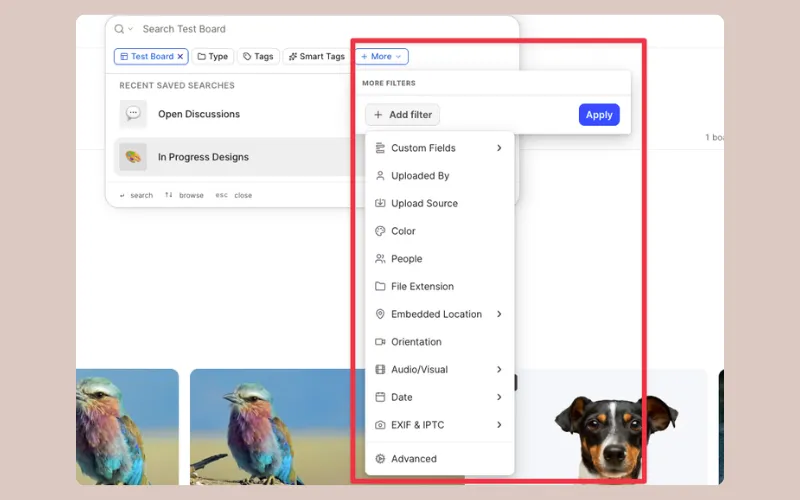
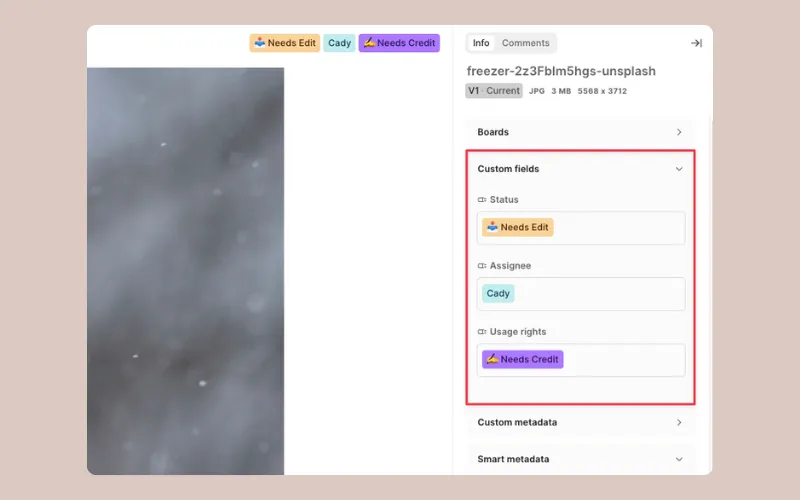 Stackable filters let a marketer narrow by file type, color, people, and field values in one pass. For example, save "Approved" plus "Licensed (paid and organic)" plus "Summer 2026" as a saved search, and the opening question has a one-click answer that stays current. The first three select fields also appear as quick filters under the search bar, so put status and rights first.
Approvals and rights that stay on the asset
Multi-stage approvals attach owners, due dates, and visible status directly to the file, and Kanban views show assets moving from "In progress" to "Approved." Status becomes a live value the workflow updates, not a field someone forgot to change.
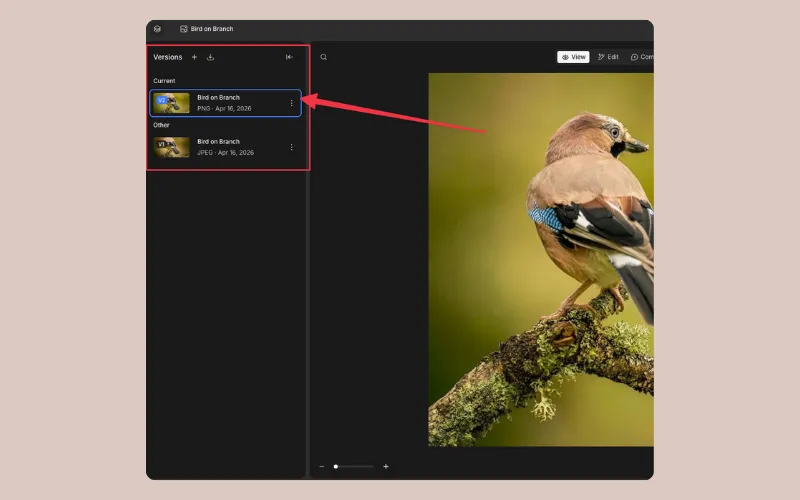 Version Stacking keeps new iterations on top of the original, so the current approved file is the one people see and nobody exports from a stale source. Paired with the rights field, anyone can confirm what's approved and how it may be used before adapting it for a channel.
Embedded file details and search by content
Air reads embedded EXIF and IPTC details on upload, including camera, creator, copyright, and original keywords, so metadata from past shoots isn't lost in the move. Filtering by those details is available on Enterprise.
 OCR, document intelligence, and transcripts make text in images, PDFs, decks, and video searchable, covering assets nobody would have tagged by hand. At Candid, the Lead Brand Designer went from spending up to 20% of the week finding assets for colleagues to around 2%.
Cleanup and migration from a messy library
Cloud Imports bring archives in from Google Drive, Dropbox, Box, and SharePoint, consolidating scattered storage into one workspace. When Beautiful Destinations moved off a legacy DAM, they filed a request with their Air support team, and within two weeks all 40,000 assets were in Air, with their customized metadata intact. For the full rollout plan, see our guide to DAM implementation.
For the monthly tidy-up, Tag Manager lets you merge duplicate tags in bulk, and the "Is untagged" filter shows where coverage has gaps. Air's agent can rename, tag, or fill in fields across a selection of assets from a plain-language instruction, and you review the changes before they run.
Limits to keep in mind
Air does have a few limitations for a couple of use cases:
Only single- and multi-select fields can be filtered. Date fields won't power an expiry view on their own. A practical workaround is a select field like "Rights window: Active, Expiring this quarter, Expired" that the owner updates during the monthly review.
Tags and custom fields don't travel with a downloaded file. Put anything a partner needs in the filename or on a share link, which can carry an expiration date on Business and Enterprise.
Nested or dependent field values aren't available, which is another reason to keep the schema flat and faceted.
These limitations apply at the time of writing.
Build a taxonomy that survives contact with your team
The schema that works is small enough to enforce and close enough to how people search that nobody needs training. The sequence should go something like this:
Start from real search requests
Lock five to seven required fields as fixed lists
Let AI tag what's inside the file
Keep naming light and boards broad
Give it one owner and a monthly tidy-up
Air holds assets, versions, approvals, and metadata in one visual workspace, and that context is what makes approved work easy to find and scale. It matters more as AI does more of the work, because each asset's metadata is the context the AI acts on.
Start a free Air workspace, import one messy folder, and see how much of the taxonomy builds itself.
DAM taxonomy FAQs
What is the difference between metadata and taxonomy?
Metadata is the information attached to each asset, like its product, usage rights, and file details. Taxonomy is the agreed set of fields and allowed values that keeps that information consistent across the whole library.
How many metadata fields should a DAM have?
Most lean teams should start with five to seven required fields, such as approval status, usage rights, brand, campaign, and channel, and add more only when real requests show a gap.
Does AI tagging replace a DAM taxonomy?
No. AI tagging covers what's visible in a file, but it can't know approval status, usage rights, or campaign, so those still need human-owned fields with fixed values.
Should I organize a DAM with folders or metadata?
Use metadata for precise filtering and a few broad boards for rough structure, because folders force one path to each asset.
Who should own the DAM taxonomy on a lean team?
One named person, usually a brand ops or marketing ops lead, who approves new values and runs a regular tidy-up.
How do I clean up a messy Drive or Dropbox before migrating to a DAM?
Define your required fields first, delete obvious duplicates, then import and fill fields in batches while AI tagging covers the descriptive layer.
Can Air enforce required metadata fields at upload?
Yes, for uploads through content collection forms, which can mark custom fields as required so a file can't be submitted without them.