


Published: Nov 07, 2026
A Practical DAM Governance Plan for Brand and Creative Teams

Table of contents
What a DAM governance plan has to decide
Assign DAM ownership and control access
Govern approvals and versions in one place
Manage asset rights and usage through the content lifecycle
Where AI tagging and search fit in your governance rules
Governance that lets your team move faster
DAM governance FAQs
You’ve probably had some version of this: Legal wants to know who approved last spring's shoot for paid social, and a regional partner just ran a campaign image whose usage window closed two months ago. Everyone has a theory about what happened or who to talk to, but nobody can point to a written rule.
You already know what digital asset management is for and why governance matters, but what most governance advice gets wrong is where it stops: "write a policy." In practice, teams only maintain governance when it's a small set of rules that live inside the library your team opens every day.
This guide covers ownership and access, approval as the gate, versions, rights and expiry, retention, and where AI tagging fits.
What a DAM governance plan has to decide
Digital asset management governance is the set of decisions about who owns the library, who can do what, what counts as approved, and how long assets stay usable. A workable DAM governance plan makes seven of them:
Named ownership: who is accountable for each brand or library
Roles: what each level of access can do to approved work
The approval gate: the one status that decides whether an asset can leave
Version rules: where working files and finals live
Rights and expiry: what gets captured at upload
External sharing: how agencies and partners get in, and how they get cut off
Retention and deletion: what gets archived, when, and by whom
Governance fails when it's written as a document instead of used as settings, fields, and statuses inside the system. For example, a PDF in a wiki can't stop anyone from downloading a draft, but a status field can make the draft obvious.
That's also why a lean DAM governance structure beats an enterprise governance board for most teams. How much of this you can enforce depends on your platform, and the best DAM solutions differ most in how many of these rules they turn into settings.
Assign DAM ownership and control access
The first decision is naming a human owner for each brand or library, then writing permissions for roles rather than for individuals. Everything else builds on those two choices.
Use one named owner per brand, library, or board
Give each brand, region, or library a single accountable owner. This person approves structure changes, settles naming disputes, and answers IT and legal when they come asking.
Quick tips: Ownership usually sits with creative ops, a brand manager, or the creative director rather than IT, because the owner needs to understand what the assets are for. Plus, avoid ownership by committee. When five people share responsibility for the library, nobody actually enforces anything.
Write down the owner, their backup, and what they can decide on a single page, and link it from the library itself instead of burying it in a wiki.
Define permissions by workspace role
Keep the role model small: admin, editor, commenter, and viewer. Define each by what it can do to approved assets, not by who holds it.
For a growing team, the most useful rule in DAM permissions and access control is separating upload rights from approval rights. Plenty of people should be able to add work. Far fewer should be able to mark it final.
In Air, workspace roles cover the basics: editors upload and update fields like Status, commenters (Business and Enterprise) review without changing anything, and viewers are an Enterprise role. Enterprise teams can add custom roles and access-controlled libraries that partition content by brand, region, or team, so each group only sees its own source of truth. The same separation matters when you govern several brands and regions from one workspace.
Control access for external partners
The practical rule for agencies and freelancers: give them board-level access on a paid plan when they're actively working in the library, or a share link when they only need to view, comment on, or download a defined set of assets. Board users in Air can be editors, commenters, or viewers (depending on your plan) on specific boards without seeing the rest of the workspace.
On Business and Enterprise plans, every external share link should carry the same access controls:
A passcode
An expiration date
Name and email gating so views and downloads are attributed to a person
Download permissions set deliberately
Version visibility limited to the latest approved cut where your plan supports it
Download notifications and expiring links let an owner close access without renegotiating permissions across the whole workspace.
Vivian Health's marketing team saw how much friction this removes. As Art Director Rishad Amarkhel put it, "They could create boards and share assets with external agencies independently. It eliminated the hassle of permissions and made our marketing operations more efficient."
Inbound files need governing too. Content collection form links let agencies and photographers deliver straight into the right board without an account or a seat, and the form can require fields before anything is submitted.
When you need enterprise-grade controls
If your IT and security reviews go deeper, Air's Enterprise plan adds custom roles configured with Air's customer success team, access-controlled libraries by brand or region, SAML SSO with IdP groups controlling library access, automated content expiration, inactivity logout, and 180-day deletion recovery, all on top of SOC 2 Type II.
To be clear though, teams that need territory-level rights management or compliance audit trails as a primary requirement are the buyers that enterprise DAM software such as Orange Logic and Aprimo is built for. Security and procurement teams tend to ask a predictable set of questions, and a reviewer's governance checklist helps you answer them before the evaluation stalls.
Govern approvals and versions in one place
The most enforceable rule in any DAM governance plan is a single approval status that gates distribution, but it only works when working files, finals, and the feedback behind them sit in the same place.
Use approval status as the only gate that matters
Pick a short status set (draft, in review, approved, published, expired) and one rule: nothing goes to a partner or a channel until the status reads Approved.
Here's how that becomes operational in Air:
A Status custom field on every asset (Status is one of the default fields in every workspace)
A saved search that returns everything currently Approved, which stays up to date as statuses change
External shares built only from that saved search or an Approved board
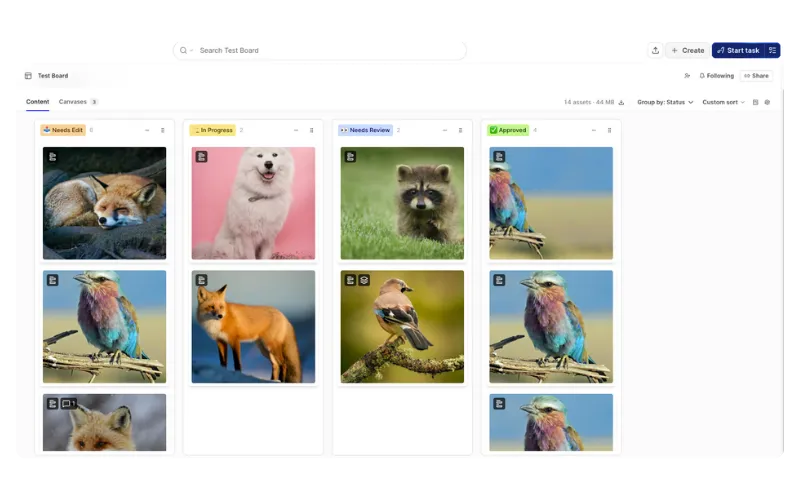 Air's multi-stage approvals assign owners and due dates and send notifications (including Slack on Business and Enterprise), so approval is actually tracked.
Keep working files and finals in one version stack
Keep working files and the approved final in the same system, stacked on one asset with its history intact. Splitting them across a working drive and a DAM is how teams end up exporting from an outdated source.
Air's Version Stacking layers each new iteration on top of the original, so the current approved cut is the one people see and download, while earlier versions stay in the stack for reference. That stops "FINAL_v4_USE_THIS" filenames and exports from outdated sources.
Make sure decisions stay attached to the asset
Governance records belong on the file, not in Slack threads, email chains, or a project ticket that closes when the task does.
Air's visual annotation pins comments to specific areas of an image or timestamps on a video, and threads resolve inline. This means the decision history stays with the asset, so when the legal team or a new hire asks why something was approved six months later, the answer is on the file. That record is also what keeps a DAM workflow and process auditable from intake to delivery.
Manage asset rights and usage through the content lifecycle
Rights and lifecycle rules are the part of digital asset management governance teams skip most often. They're also where the expensive mistakes can happen.
Capture rights and usage at the moment of upload
Set a short field list for every upload: asset type, campaign, channel, product, region, usage rights, status, and expiry date. Resist anything longer, because a taxonomy nobody maintains is worse than a short one everybody does.
Air's custom fields support single-select, multi-select, text, and date types, and content collection forms can mark fields as required so the information is a condition of entry.
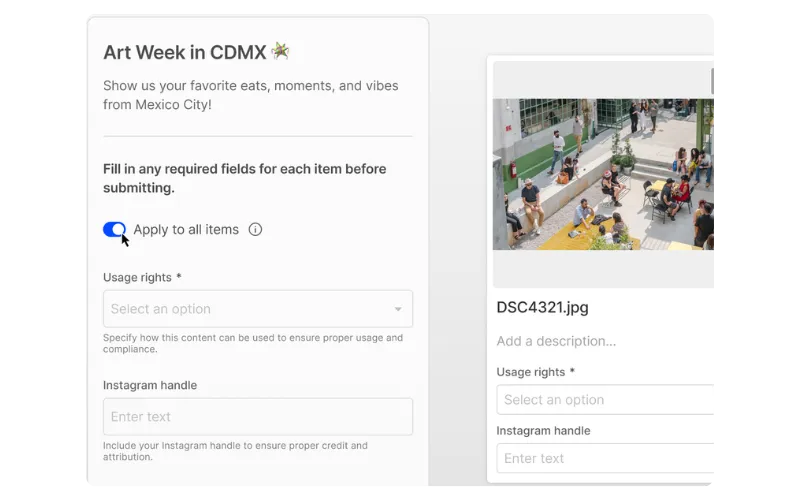 With that field set in place, a marketer can filter for approved, in-rights, region-appropriate assets and self-serve without pinging the creative team. The rest of your DAM metadata and taxonomy can grow from these eight fields.
Check for expiring assets and pull them from circulation
On most Air plans, expiry does mean a recurring manual check (at the time of writing). Date fields hold the expiry date but aren't filterable, so the owner should run the sweep monthly or quarterly: review assets by expiry date in table view and move anything lapsed out of circulation.
To make that sweep faster, add a single-select field such as "Rights window" (for example, Q1 2027) alongside the exact date. Single-select fields are filterable, so a saved search for the coming quarter shows exactly what's about to lapse. Pair it with a named owner and a recurring calendar reminder.
Teams that want the system to handle this instead of a person can use automated content expiration on Air's Enterprise plan. Either way, the risk you're preventing is the same: paid talent or licensed imagery still live on a landing page after the usage window closed.
Keep published assets current everywhere
Most governance advice stops at organizing approved files. The harder problem, and the one that decides whether you maintain brand consistency, is outdated creative still live on websites, in emails, and with partners.
On Business and Enterprise plans, Air's original-file CDN links (currently in beta) can follow an image's current version, so stacking an updated file in Air updates it wherever the link is live rather than triggering a round of replacement requests. When assets get adapted for new channels and regions, your workspace Context keeps the output on brand.
Teams build brand kits with fonts, colors, logos, and usage rules, and Air Canvas applies that brand context to every edit.
That means a resize or localized variant made with Air's AI design and editing tools doesn't need another review round. The governance rule underneath is simple: one source of truth means one place to fix things.
Set retention rules and decide when to archive or delete
The lightweight model is an archive board or an "Archived" value in your Status field. Enterprise teams can use an access-controlled library for the archive instead.
You can also write a retention rule per asset type, since campaign creative, raw shoot files, and partner deliverables rarely have the same lifespan. Deletion recovery is the safety net behind those rules: 90 days on Business and 180 days on Enterprise, so archiving decisions stay reversible.
One warning: don't delete raw files to save storage. Teams that do usually need them again the moment a reshoot or a new crop comes up.
Where AI tagging and search fit in your governance rules
Modern DAM governance should shrink manual metadata work, not add to it. Auto-tagging handles the descriptive bits, so people only fill in the fields that need judgment.
Air's visual recognition tags images and video by objects, colors, and concepts as files upload. OCR makes text inside images and PDFs searchable, and transcription does the same for spoken words in video. That creates a clear division of labor:
AI handles | People handle |
What's in the asset: objects, colors, concepts, on-screen text, speech | Status, usage rights, campaign, region, and expiry |
Conversational search lets a marketer type "surfer photo at sunset" instead of guessing at whoever named the file. That reduces how much you need to police naming conventions in the first place.
One caution though: AI tagging doesn't replace the approval gate. Tags make assets findable, while status decides whether they're usable. The same logic applies when you extend library access to AI agents: guardrails for Air's MCP server scope what those agents can reach, for example.
Governance that lets your team move faster
A DAM governance plan is really just a handful of enforceable rules: named ownership, a short role model, one approval gate, one version stack, required rights fields, controlled external sharing, and a retention rule.
Most teams can set the workspace rules up in a week: Name owners, define roles, and add a status field. Then stack versions, set required upload fields, and lock down external links.
Air is a DAM with AI built for creative teams, where each of these rules is a setting rather than a policy document. Creative teams build the standard, and marketing runs from it. To see how your rules would map to the library, book a personalized walkthrough.
DAM governance FAQs
What should a DAM governance plan include?
Named owners, a small role model, one approval gate, a version rule, required rights and expiry fields, external sharing controls, and a retention rule.
Who should own DAM governance on a lean creative team?
Usually creative ops, a brand manager, or the creative director, since the owner needs to know what assets are for. Name one accountable person per library, plus a backup.
How do you govern agency and freelancer access to a DAM?
Give active collaborators board-level access on a paid plan and everyone else a share link with a passcode, expiry date, and name and email gating (Business and Enterprise). Use content collection links for inbound files.
How does AI tagging fit into DAM governance?
AI tags what's in the asset so people don't have to, which frees humans to fill in status, rights, and expiry. Tags make assets findable, but status still decides whether they're usable.
Should working files and approved finals live in the same DAM?
Yes. Stacking them on one asset keeps the approved cut on top and the history intact, which removes the risk of exporting from an outdated source.
How do you stop outdated assets from being used after approval?
Share only from an Approved saved search, keep finals on top of a version stack, and use links that update in place. Run a regular expiry sweep, or use automated content expiration on Enterprise.
What governance controls require an enterprise DAM plan?
In Air, custom roles, access-controlled Libraries, SAML SSO with IdP groups, automated content expiration, inactivity logout, and 180-day deletion recovery are Enterprise features, all backed by Air's SOC 2 Type II security.