



Published: Nov 23, 2026
How to Choose a DAM System: A Requirements Checklist and RFP Template You Can Copy
Table of contents
What "right-sized" means before you shortlist anything
Who should be in the room when you choose a DAM
The DAM requirements checklist and RFP template
How to run a DAM evaluation for your team
Where Air lands on this checklist
How to choose a DAM FAQs
You’ve probably been there: the campaign launches on Monday, and on Friday nobody can find the approved hero image. One version is in a designer's Dropbox, another is in Slack, and a third sits in a folder called "V2_FINAL." Someone volunteers to "look into a DAM" without knowing what to ask for.
But here’s the catch: there's no single best DAM, only the best fit for your asset volume, team size, workflow, and approvers. The reliable way to choose is to write your requirements down, judge each platform by how work moves through it rather than by its feature list, and score every vendor against the same checklist.
If you've already built the business case for DAM ROI, this guide covers the next step: picking the platform, with a DAM RFP template you can copy straight off the page.
What "right-sized" means before you shortlist anything
Many teams researching how to choose a digital asset management system aren't choosing between DAMs yet. Instead, they’re trying to figure out if they need a DAM, a creative workflow tool, or more discipline in the cloud storage they already have. Here’s a bit of guidance to help you get started.
Signs you've outgrown Drive, Dropbox, or SharePoint
If several of these sound familiar, folder cleanup alone won't fix the problem:
The same final lives in several folders, and nobody's sure which copy is current
Marketers DM designers for files instead of finding them (and not because they’re being lazy)
External sharing runs on one-off WeTransfer links
Onboarding a new hire takes weeks because the folder logic lives in one person's head
Video review happens in a separate tool, so feedback and files never meet
The breaking point here is usually workflow. Teams rarely run out of space; they run out of ability to find and trust what they already have.
DAM vs MAM vs cloud storage vs creative workflow tools
There are a few similar tool categories out there, so here’s the rundown:
Cloud storage handles sync and sharing but isn't built around approval status or visual search.
A MAM is built for broadcast and long-form video.
Proofing tools handle review and approvals but leave approved work to be filed somewhere else.
Digital asset management adds metadata, search, permissions, and a home for finals, though traditional DAMs often keep working files and review elsewhere.
This stacking of categories is why teams end up stitching together Dropbox, a proofing tool, WeTransfer, and a DAM, then spend their days downloading, re-uploading, and renaming between them.
Most mid-sized brands are better served by DAM and creative operations in one place: a library with review and approvals on the same asset.
The middle ground: outgrown Drive but not ready for a complex DAM
Lean teams often get pitched enterprise DAMs and inherit a taxonomy model, an admin role, and an implementation timeline they can't staff. If that's you, weight visual previews, search that works without perfect filenames, obvious version history, approvals tied to the file, and adoption that doesn't need training sessions.
Avoid mandatory metadata schemas, per-seat pricing that discourages inviting stakeholders, and any system that only works while one DAM admin keeps it running.
Who should be in the room when you choose a DAM
DAM buying groups now span creative, marketing, and IT or operations, and at larger companies legal, IT, or procurement tend to sign off last. Capture their requirements at the start rather than during contract review.
Stakeholder | What they score |
Creative leads | Version clarity, annotation, brand control, and file type support |
Marketing leads | Search speed, self-serve access, channel resizing, and reuse |
Creative or marketing ops | Permissions, taxonomy, migration effort, and adoption |
IT | SSO, SCIM provisioning, audit logs, data residency, uptime, and API access |
Legal | Data ownership, usage rights, the DPA, and GDPR |
Procurement | Pricing structure, renewal escalators, and exit clauses |
Name one owner for the scorecard and give each stakeholder veto power only over their own must-haves. Before the first demo, ask each of them for their top non-negotiables in writing. That list becomes your RFP.
The DAM requirements checklist and RFP template
Copy these tables into a spreadsheet or send them to vendors as your RFP. Each line has a requirement, a suggested priority (change it to fit your team), the question to ask, and a score: 0 for no, 1 for partly, and 2 for yes.
The scoring rule: a 0 on any must-have rules the vendor out, regardless of its total score.
Mark your must-haves before the first demo, so a vendor's pitch can't reorder your priorities. To compare vendors, add a score column for each one.
Finding and organizing
Test whether people outside the creative team can find assets without knowing filenames, and whether search still works when tagging slips.
Requirement | Must-have or nice-to-have | Question to ask each vendor | Score (0 / 1 / 2) |
Search without exact filenames | Can a marketer with no training find an approved asset in under 30 seconds using a plain-language description? | ||
AI auto-tagging on upload | What happens to search quality if nobody tags anything manually? | ||
Custom metadata fields | Can we add fields for campaign, product, channel, and usage rights, and filter by them? | ||
Search inside files | Does search read text in images and PDFs, and speech in video? | ||
One file in several places | Can one asset sit in several collections without being duplicated? |
Working files and versions
Version confusion is a common source of rework, so check that the current approved file is obvious to anyone who opens the asset.
Requirement | Must-have or nice-to-have | Question to ask each vendor | Score (0 / 1 / 2) |
Version history on one asset | Does a revision stack on the original or create a new file? | ||
An obvious approved version | How does someone outside the creative team tell which version is approved? | ||
Working files and finals together | Can layered working files and exported finals live in one system? | ||
Creative context kept | Does the system keep why the asset was made and what it was approved for, or only the file? |
Review and approval
Feedback should stay on the file it's about, not in email or Slack threads that someone has to piece together later.
Requirement | Must-have or nice-to-have | Question to ask each vendor | Score (0 / 1 / 2) |
Comments pinned to the asset | Can reviewers pin comments to a spot on an image or a timestamp on video? | ||
External reviewers | Can an external reviewer comment without a paid seat or joining our workspace? | ||
Multi-stage approvals | Can we set approval stages with owners and due dates? | ||
Feedback history | Where does feedback live after approval? |
Sharing and permissions
Self-serve access only works if you control who sees what, inside the team and outside it.
Requirement | Must-have or nice-to-have | Question to ask each vendor | Score (0 / 1 / 2) |
Password-protected, expiring links | Which sharing controls are gated to a higher plan? | ||
Granular roles and libraries | Can we create our own roles and split content by brand, region, or team? | ||
Curated partner access | Can we give a partner one curated set without exposing the library? | ||
Usage rights and expiry fields | Can we record rights and expiry dates and filter out expired work? |
Score this group with creative leads and legal both present, since governance is where their priorities overlap.
AI capabilities
AI belongs on the scorecard, but more generated files with no approval state make the original problem worse.
Requirement | Must-have or nice-to-have | Question to ask each vendor | Score (0 / 1 / 2) |
Tagging accuracy on your assets | Can we test auto-tagging on our own files during the trial? | ||
Brand rules applied to AI output | Does AI output follow our fonts, colors, logos, and usage rules, or start from a blank model? | ||
AI pricing and plan access | How are AI actions metered, and which AI features are on the plan we're buying? | ||
Training on customer content | Is our content used to train AI models? |
Integrations
List the tools your team uses every day before the first demo, then check which ones connect and on which plan.
Requirement | Must-have or nice-to-have | Question to ask each vendor | Score (0 / 1 / 2) |
Creative tools | Which of Figma, Canva, and Adobe connect natively? | ||
CMS and commerce | Which CMS and commerce platforms connect, and on which plan? | ||
API and automation | Are the API and tools like Zapier available on our plan? |
Security and admin
These lines let IT, legal, and procurement review the same document as the evaluation team. Ask every vendor all of them.
Requirement | Must-have or nice-to-have | Question to ask each vendor | Score (0 / 1 / 2) |
SOC 2 Type II | Can we see your latest SOC 2 Type II report? | ||
GDPR and a DPA | Do you offer a standard DPA and publish your sub-processors? | ||
SSO via SAML 2.0 | Which plan includes SSO? | ||
SCIM provisioning | Which plan includes SCIM provisioning? | ||
Audit logs | What do admin activity logs record, and how long are they kept? | ||
Uptime commitment | What uptime do you commit to, and what credits apply if you miss it? |
Contract, data ownership, and exit
These lines matter most to legal and procurement, and they're far easier to negotiate before signing than at renewal.
Requirement | Must-have or nice-to-have | Question to ask each vendor | Score (0 / 1 / 2) |
Data ownership | Who owns our files and metadata under the contract? | ||
Complete export | If we leave, can we export assets with version history and metadata? | ||
Renewal terms | What's the notice period, and is there a price escalator at renewal? |
Migration and support
Migration and onboarding costs are easy to miss in a quote that only shows the license, so ask about them early.
Requirement | Must-have or nice-to-have | Question to ask each vendor | Score (0 / 1 / 2) |
Self-serve importers | Can we import from Drive, Dropbox, Box, and SharePoint ourselves? | ||
Metadata preservation | How much of our existing metadata survives the import? | ||
Who runs the migration | Who does it, how long does it take, and what does it cost? | ||
Onboarding fees | Are there implementation fees outside the license? |
How pricing scales
Requirement | Must-have or nice-to-have | Question to ask each vendor | Score (0 / 1 / 2) |
Access for viewers | Do stakeholders who only view or comment need a paid seat? | ||
Cost at growth | What does this cost at twice our current asset volume? | ||
AI usage | Do AI credits roll over, and what does an overage cost? | ||
Plan gating | Which features on this checklist sit above the plan you've quoted? |
Price seats, storage, and AI usage separately, at today's volume and next year's, since a vendor can be generous on one and steep on another. Per-seat models should have some extra scrutiny though: when every login costs money, teams stop inviting the marketers and agencies who most need access.
How to run a DAM evaluation for your team
Apply the scorecard the same way to every vendor: audit current pain points, lock must-haves, shortlist three of the best DAM solutions for your size, then run scripted demos, pilot, score, and check references.
1. Use scripted demos instead of vendor-led tours
Send every vendor the same scenarios in advance, such as "find last spring's approved lifestyle photography for the EU market" or "share 40 approved assets with a retail partner for 30 days." Ask them to perform each one live, and score straight after the demo while the details are fresh.
2. Run a pilot with your own files
Demo libraries are tidy and yours isn't, so test with real assets before you sign. Migrate one campaign, run one real approval cycle, and have a marketer find and resize an approved asset without asking a designer, timing each task against today. Set success criteria first, and if people don't use the tool during the trial, read that as a signal about the tool rather than the team.
3. Record red flags that lower a vendor's score
Mark down a metadata model that needs a consultant, search that only works on filenames, approvals in a separate product, fees disclosed late, key features gated above your budget, and no clear export path. If the demo needs an admin to do the work, non-technical teammates won't use it. Keep reference calls focused on adoption and support though, since you've already scored the features.
Where Air lands on this checklist
Here are the main lines of this checklist answered for one vendor, with plan-level detail stated plainly so IT and procurement can check it. Air is an agent for creative tasks that covers both DAM and creative operations. A DAM stores what you made, while Air remembers why you made it and helps you scale it everywhere, so approved work gets reused instead of recreated.
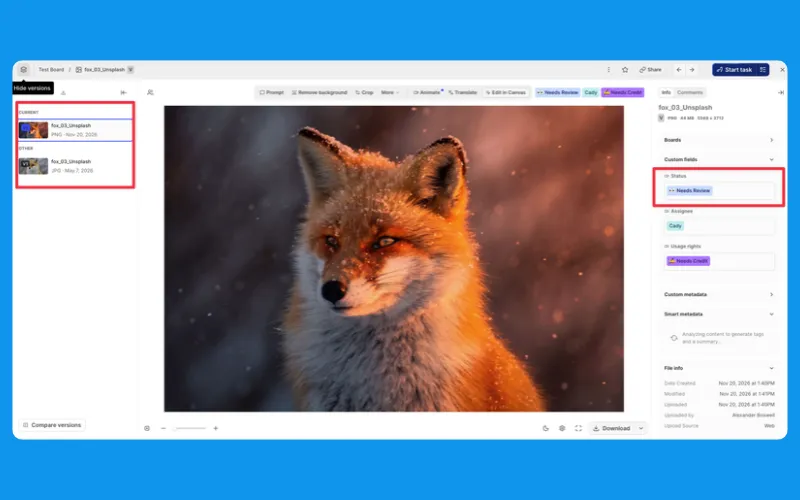
Finding, versions, and review: In Air, Conversational Search, auto-tagging, OCR, and video transcripts in 100+ languages make assets findable without perfect filenames. Version Stacking keeps the current file on top, and comments and multi-stage approvals stay pinned to the asset.
Security: Air is SOC 2 Type II audited and covers GDPR with a standard DPA, per our security page. It doesn't use customer content to train AI models.
Admin by plan: SSO via SAML 2.0, SCIM user provisioning, custom roles, and access-controlled libraries are on Enterprise, and workspace admins can review activity logs. Password-protected and expiring share links are on Business and Enterprise.
Users and usage: Free includes up to 3 users and Starter up to 5, while Business and Enterprise include unlimited users. Storage and AI credits scale separately from users, and current pricing figures are on Air's pricing page.
Migration: Cloud Imports copy content in from Google Drive, Dropbox, Box, and SharePoint on any plan, with custom migration on Enterprise. When Beautiful Destinations left its previous DAM, all 40,000 assets reached Air within two weeks with their custom metadata intact.
Brand context for AI: Brand kits in Context apply fonts, colors, logos, and usage rules to edits in Air Canvas, so adapting an approved asset for new channels doesn't reopen a brand review.
 Once the contract is signed, DAM implementation becomes its own project. Until then, put Air through the same scripted demos and pilot as every other vendor on your list.
See how Air can help your team understand, organize, and scale creative with a personalized product walkthrough.
How to choose a DAM FAQs
Here are short answers to the questions that come up most often when a team starts a DAM evaluation.
How do you choose a DAM?
Write down your requirements, mark each as a must-have or nice-to-have, and score every vendor against the same list. Then run scripted demos and pilot the frontrunner on your own files.
What should a DAM RFP include?
A digital asset management RFP should cover search, versions, approvals, sharing, AI, integrations, security, contract and exit terms, migration, and pricing. Each line needs a requirement, a priority, a vendor question, and a score.
Who should be involved in choosing a DAM?
Creative, marketing, and ops leads should drive the evaluation, with IT, legal, and procurement involved from the start. Collect their must-haves before the first demo, since they often sign off last.
What's the difference between a DAM and cloud storage like Google Drive?
Cloud storage holds files in folders. A DAM knows which version is current, whether it's approved, and who can use it.
Which DAM security features are usually limited to enterprise plans?
SSO, SCIM, custom roles, and audit logs often sit on a vendor's top tier, so ask which plan includes each. In Air, SSO, SCIM, custom roles, and access-controlled libraries are on Enterprise.