


Published: Nov 18, 2026
9 Digital Asset Management Trends to Watch in 2027
Table of contents
AI agents that take action across asset libraries
Creative teams look to consolidate their tools
Creative governance will get more complex
Is your DAM ready for 2027? A readiness checklist
What these trends mean for the way creative work gets scaled
Digital asset management trends FAQs
AI made production cheap, and creative teams responded by making more of everything: more cuts, more sizes, and more variants per campaign. The systems keeping that work together mostly stood still, with folders, share links, and feedback scattered across Slack looking much as they did in 2019.
The digital asset management trends shaping 2027 are less about storing more and more about systems that understand, act on, and scale what a team has already approved. The nine trends below come from what creative and enterprise teams ask for on buying calls, and they fall into three groups: AI agents, consolidation, and governance.
The guide then finishes up with a readiness checklist you can use to audit your current setup.
AI agents that take action across asset libraries
The first wave of AI in digital asset management was descriptive: it looked at an image, applied tags, and stopped. The next phase is operational. AI now carries out tasks inside the library and answers questions about what's in it, which matters most to lean teams whose asset volume grew faster than their headcount.
1. Agents take over library housekeeping
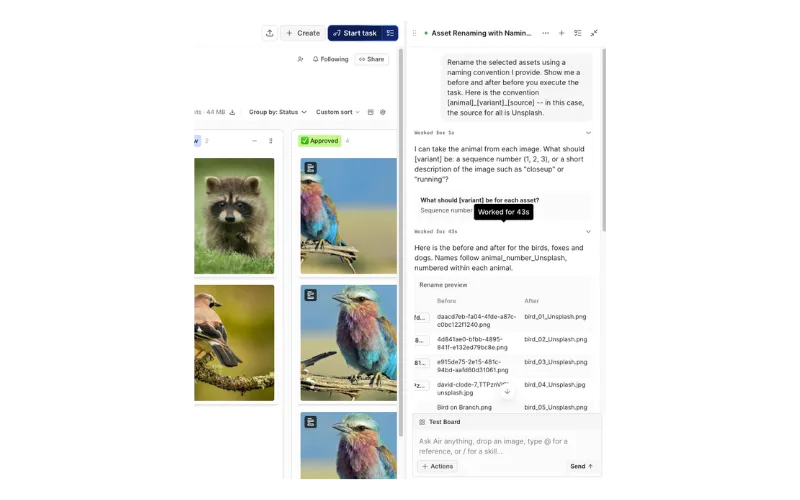
The jobs teams hand to an agent are the unglamorous ones, described in a plain sentence: apply consistent tags across thousands of assets or rename a shoot's files to match the naming convention.
In Air, your agent for creative tasks handles these jobs from a plain-language instruction. It tags and renames at scale, and it gives status summaries that surface the approvals, comments, and board activity that need your attention. Humans decide what's worth making, and the agent handles the rest.
 There's a limit worth knowing, though. An agent works from the context already in your library, so the quality of your approvals, versions, and metadata sets the ceiling on what it can do.
2. AI assistants connect directly to the asset library
Teams increasingly want to query their asset library from the AI assistants they already use, such as Claude, instead of switching into another interface. Model Context Protocol (MCP) has emerged as the standard for that connection, becoming a baseline requirement instead of a differentiator.
In Air, for example, the MCP server is available on Business and Enterprise plans and lets an assistant find, organize, and upload assets: search with filters, rename, tag, set custom fields, create boards, and add assets to them, but it doesn't edit the assets themselves.
For a marketing lead, the use case here goes something like this: ask your assistant to pull every asset marked approved for the spring campaign onto a new board, and it does it without you opening the DAM.
3. Search that reads what's inside the asset
Search that depends on filenames and folder paths only works if someone named and filed everything correctly. The shift is toward search that indexes the content of the asset itself, which means you can now evaluate:
Visual recognition of objects, colors, and concepts
OCR for text inside images and PDFs
Full-text indexing of decks and documents
Time-synced video transcription, so you can search by spoken word
Conversational queries in plain English
In Air, Visual Recognition and Auto-Tagging apply smart metadata on upload. Custom Object Recognition can be trained on your own logos and products, and Facial Recognition lets you filter a shoot by the talent in it. A query like "surfer photo at sunset" works without anyone having tagged the surfer.
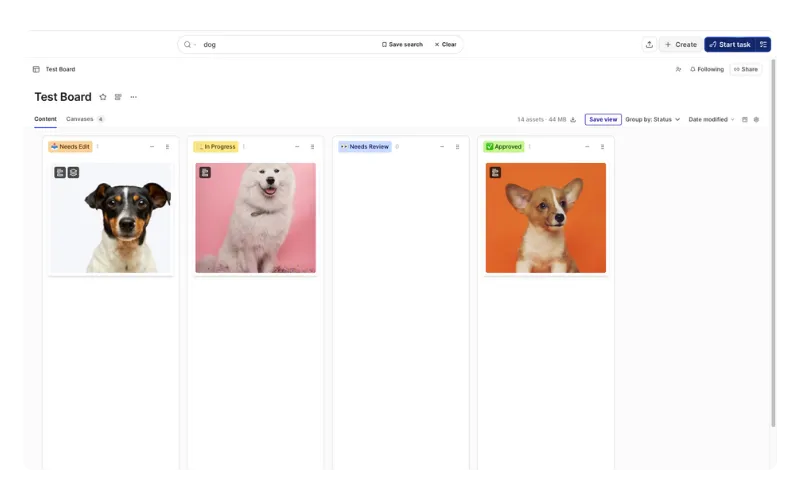 The main benefit of this approach is that a marketer who can find the asset stops asking a designer for it. At Candid, search was the main reason the team switched to Air. The time their Lead Brand Designer spent finding assets for other people dropped from up to 20% of the week to around 2%.
Creative teams look to consolidate their tools
The second cluster of DAM trends for 2027 is structural, meaning teams are retiring the stack of Dropbox, Frame.io, WeTransfer, and a project tool, because every handoff between tools costs a download, a re-upload, a rename, and a piece of lost context.
4. Working files and finals live in the same system
The legacy setup split creative work in two: a DAM for approved finals and cloud storage for working files. The moment a file was marked final, its working history stayed behind in another tool, along with the feedback and approvals that made what you’re looking at.
Teams are collapsing that split because the history is what makes an asset reusable later.
For example, in Air, Version Stacking puts each new iteration on top of the original, so the current approved file is obvious and past versions stay one click away. Visual annotation pins comments to a spot on an image or a timestamp on a video, and approvals with owners and due dates keep the decision record on the file.
Getting there is a migration problem as much as a tooling one. Candid brought work scattered across Dropbox, Google Drive, and hard drives into an Air workspace that now holds 90,000 assets across 5.5 TB. Air's migration paths include Cloud Imports from Google Drive, Dropbox, Box, and SharePoint; Air Flow for two-way sync with macOS Finder; and Content Collection upload links for freelancers and agencies who don't have an account.
5. Channel adaptation happens inside the DAM
Asset management is turning into asset multiplication. The bottleneck is no longer the hero asset; it's the TikTok cut, the email header, the paid social variants, and the regional versions that follow.
That adaptation work is moving into the library, because the library already holds the approved source file and the brand rules.
Inside Air, Air Canvas is a context-powered AI design and editing surface that turns one approved design into hundreds of on-brand deliverables. It draws on brand kits built in Context (fonts, colors, logos, and usage rules), and its smart resize generates channel variants while preserving layout, text, and no-fly zones.
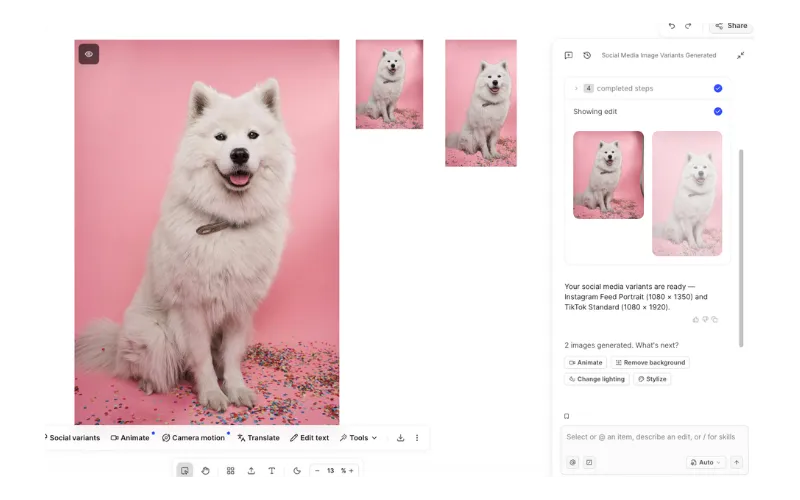 Skills add another repeatable layer. You save an AI edit once as a named workflow, then run it on any asset or batch of assets later.
For Creative Directors and other senior creatives, the benefit is governance. Adaptation starts from approved work and approved brand rules, so scaling output doesn't have to mean a fresh review round for every variant.
6. Self-serve access becomes the default
Marketers, sales teams, agencies, and partners now expect to pull approved assets on their own, without turning the creative team into a help desk. Self-serve only works with guardrails: access-controlled libraries, custom roles, share links with passwords and expiration dates, and a clear line between work in progress and approved finals.
The enterprise DAM rollouts of the past decade often handled this with a dedicated administrator. Brands with fewer than 500 people rarely have one, so governance has to work without a full-time owner.
In Air, library segmentation partitions content by brand, region, or team, with access-controlled libraries and custom roles on Enterprise. Secure Share Links also let reviewers see work without an Air account and comment without joining your workspace, with passwords and expiration dates on Business and Enterprise. Finally, Showcases package boards, assets, and files from across the library into a single link, branded with your logo and colors on Business and Enterprise.
Creative governance will get more complex
The final cluster of digital asset management trends for 2027 is about the questions AI created rather than solved: how teams control what generative tools produce, how they prove where an asset came from, and who sits in the room when a DAM gets bought.
7. Guardrails on generative AI
Teams are writing internal policy on where generative AI belongs in the creative process. It's an emerging practice rather than a solved problem, and the right answers vary widely by industry and legal exposure. Most policies start with four questions:
Which asset types can be AI-generated or AI-edited, and which brand elements are off-limits?
Who signs off before an AI-assisted asset is published?
How are AI-assisted assets labeled internally?
How are brand rules enforced at the point of creation, not after it?
Guardrails you set up only work if approval status is visible on the asset itself. A policy tracked in a separate document tends to get skipped the first time a deadline slips.
8. Provenance and AI labeling enter the evaluation
Content provenance and AI disclosure are starting to appear in DAM evaluations and in industry research. There are some practical drivers, like advertising disclosure requirements, platform labeling policies, rights and usage clarity, and internal audit needs as AI-generated assets enter production libraries.
Standards and implementations are still settling, so ask vendors directly about provenance support rather than assuming it exists and is included. In the meantime, you can:
Record AI involvement in a custom metadata field
Keep generated assets and approved assets in separate libraries or boards
Maintain version history that shows what was edited and when
9. The DAM buying group gets wider
DAM purchases used to sit with creative or marketing ops. Now they routinely involve IT or security, procurement, and AI transformation leads who evaluate the tool as part of a wider AI stack. Each group brings a different question:
Creative leaders want brand quality and a system of record
Marketing leads want speed and reuse
IT wants SSO, audit logs, and custom roles
AI leads want integration surfaces like APIs and MCP
Evaluations now need a shared scorecard covering creative workflow, governance, and AI integration, or they stall between departments. Map your stakeholders before the first demo, and bring the whole group into one evaluation when you compare the best DAM solutions or the best AI DAM platforms.
Is your DAM ready for 2027? A readiness checklist
A trends list is only useful if it tells you what to act on this quarter. Run this self-audit in under an hour by answering yes or no:
Can a marketer find an approved asset without asking a designer?
Is the current approved version obvious without opening a filename?
Do working files and finals live in the same system?
Can you search by what's inside an asset, including text and spoken word?
Can you find or organize assets from an AI assistant?
Can a non-designer produce a channel variant from an approved asset?
Can an external agency upload files without an account?
Is there a written policy for generative AI use?
Do you record AI involvement on assets?
Can IT enforce roles and audit access?
Sort every "no" into four groups: findability (1, 4, and 5), version control (2 and 3), adaptation (6), and governance (7 to 10). Start with whichever group generates the most repeat requests. To track progress, watch inbound asset requests per week, time to find a specific asset, asset reuse rate, revision rounds per campaign, days from brief to launch, and duplicate asset count.
Not every gap needs new software though. A generative AI policy, an AI-involvement field, and a shared evaluation scorecard are process changes you can make this month, while content-aware search, working files and finals in one system, assistant access through MCP, and in-library adaptation usually call for a platform change.
What these trends mean for the way creative work gets scaled
Every trend on this list points toward systems that keep context, not just files, because context is what lets AI act usefully on a library. A simple DAM just stores what you made. The systems that win in 2027 remember why you made it, hold what's approved, and help you scale it everywhere.
Air can help you in 2027 by bringing an agent for creative tasks, search that reads inside assets, versions and approvals attached to every file, Canvas for channel adaptation, and governance controls for internal and external access into one visual workspace, so your team can stop remaking what already exists and start building on what works.
If your audit turns up gaps, see how Air can help your team understand, organize, and scale creative with a personalized product walkthrough.
Digital asset management trends FAQs
What are the biggest digital asset management trends for 2027?
AI agents that handle library housekeeping, AI assistants connected through MCP, content-aware search, working files and finals in one system, channel adaptation inside the DAM, and self-serve access with guardrails lead the list. Governance trends round it out: generative AI policy, provenance labeling, and a wider buying group.
How is AI changing digital asset management?
AI is moving from describing assets to acting on them: searching by content, organizing libraries from a plain instruction, and adapting approved work for new channels. That shift changes the role of AI in DAM from labeling files to running parts of the workflow.
Will AI agents replace DAM managers?
No. Agents take over repetitive housekeeping like tagging and renaming, which frees DAM managers to own taxonomy, approvals, and governance, the context that makes an agent useful in the first place.
What are the latest trends in digital asset management for small creative teams?
For small teams, content-aware search and self-serve access matter most, because both cut the requests that pull designers away from creative work.
When does a team outgrow Google Drive or Dropbox and need a DAM?
You've outgrown generic storage when people regularly can't find files without asking someone, or when "final_v3" naming starts causing real errors. Another sign is approved work getting recreated because nobody can find the original.
What is MCP and why does it matter for digital asset management?
Model Context Protocol (MCP) is a standard that lets AI assistants connect to other tools, so you can find, organize, and upload assets from an assistant like Claude. In Air, the MCP server is available on Business and Enterprise plans and doesn't edit assets.
How should teams set guardrails for AI-generated assets in their DAM?
Start by deciding which assets can be AI-generated or edited, who approves AI-assisted work before publication, and how it's labeled internally. Then make approval status visible on each asset so the policy holds under deadline pressure.